# Security & Plugins  Wordpress & Plugin Development

# 8 Best Free Security WordPress Plugins in 2025

eeping your website secure is a 24/7 job. The right tools help keep watch – even when you can’t. They could be the difference between a hacked site and business as usual.

WordPress security plugins are one part of that equation. Along with quality hosting and users practicing secure habits, a plugin can thwart common attacks. They act as the last line of defense against hackers.

Adding an extra layer of protection is important, as WordPress is a preferred target due to its popularity. Legions of bots are scanning sites, looking for flaws to exploit. A vulnerability in WordPress core, a theme, or a plugin puts you at risk. Custom code that isn’t [sanitized](https://speckyboy.com/escaping-php-data-wordpress/) is also a major concern.

Thankfully, there is a variety of security plugins available. They cover different niches and use cases. We’ll introduce you to the eight best free options that help lock down your website.

---

<div class="host-card" id="bkmrk--1" itemscope="" itemtype="https://schema.org/Product" style="display: flex; flex-direction: column; border-top: none; padding: 40px 40px 40px 0px; margin-top: 0px;"><div class="host-card-body" style="display: flex; gap: 30px; align-items: flex-start;"><div class="host-details" style="flex: 3 1 0%;">  
</div></div></div><span id="bkmrk--3"></span>

## <span id="bkmrk-anti-malware-securit-1">[Anti-Malware Security &amp; Brute-Force Firewall Plugin ](https://wordpress.org/plugins/gotmls/)</span>

This plugin includes a firewall to prevent malware exploits and brute-force login attempts. However, its comprehensive malware scanner is the real star of the show. The scanner will look inside and outside your WordPress installation to find suspicious code.

Donate to the plugin and receive premium features like a WordPress core file integrity check. It’s worth installing if you suspect your [site has been compromised](https://speckyboy.com/wordpress-compromised/).

## <span id="bkmrk-wordfence-security-w-1">[Wordfence Security WordPress Plugin ](https://wordpress.org/plugins/wordfence/)</span>

Wordfence aims to be a complete security solution for WordPress. The plugin scans for malicious files, detects suspicious user activity, and blocks brute-force login attempts.

It also improves login security with [two-factor authentication (2FA)](https://speckyboy.com/two-factor-authentication-wordpress/) and reCAPTCHA integration. The premium version offers a security audit log, a real-time IP blocklist, and a more robust firewall.

![Wordfence Security WordPress Plugin](https://speckyboy.com/wp-content/uploads/2025/04/wordpress-security-plugin-02.jpg)

## <span id="bkmrk-jetpack-protect-%E2%80%93-au-1">[Jetpack Protect – Automated Malware &amp; Security Scanning ](https://jetpack.com/protect/)</span>

Jetpack has long been a do-it-all plugin suite. Jetpack Protect is a separate plugin for those who only want its security features. It scans your site daily for WordPress, plugin, and theme vulnerabilities.

You’ll also receive brute-force attack protection from botnets and other malicious actors. Upgrade to premium and receive email alerts, one-click malware fixes, and priority support.

![Jetpack Protect WordPress Plugin](https://speckyboy.com/wp-content/uploads/2025/04/wordpress-security-plugin-03.jpg)

## <span id="bkmrk-solid-security-%E2%80%93-pas-1">[Solid Security – Password, TFA, &amp; Brute Force Protection ](https://wordpress.org/plugins/better-wp-security/)</span>

The plugin formerly known as “iThemes Security” has plenty to offer in its free version. It protects against brute-force attacks at the local and network levels. Multiple types of 2FA can be added to user accounts, while strong password requirements keep users safer.

The plugin will detect file changes and scan your site for known vulnerabilities. The pro version adds trusted device recognition (to prevent [session hijacking](https://speckyboy.com/always-log-out-of-wordpress/)), passwordless login, and automated vulnerability patching.

![Solid Security WordPress Plugin](https://speckyboy.com/wp-content/uploads/2025/04/wordpress-security-plugin-04.jpg)

## <span id="bkmrk-really-simple-securi-1">[Really Simple Security WordPress Plugin ](https://wordpress.org/plugins/really-simple-ssl/)</span>

Really Simple Security helps to fill common gaps in WordPress security. First, it ensures your site takes advantage of SSL via 301 redirects from non-HTTPS URLs. It also prevents code execution in your site’s uploads folder, disables the often-hacked XML-RPC feature, and enables 2FA.

You’ll also be notified of any known vulnerabilities. The pro version adds [content security policy (CSP)](https://developer.mozilla.org/en-US/docs/Web/HTTP/Guides/CSP) generation, a firewall, and more security customizations.

![Really Simple Security WordPress Plugin](https://speckyboy.com/wp-content/uploads/2025/04/wordpress-security-plugin-05.jpg)

## <span id="bkmrk-two-factor-wordpress-1">[Two-Factor WordPress Plugin ](https://wordpress.org/plugins/two-factor/)</span>

A single-purpose plugin, Two-Factor adds 2FA to your WordPress website. It supports various methods, including email, Time Based One-Time Passwords (TOTP), and FIDO Universal 2nd Factor (U2F).

TOTP support means you can use it with apps like Google Authenticator. Note that you’ll need to assign 2FA to users individually. This makes it more suited for sites with a small number of users.

## <span id="bkmrk-limit-login-attempts-1">[Limit Login Attempts Reloaded WordPress Plugin ](https://wordpress.org/plugins/limit-login-attempts-reloaded/)</span>

Brute force attacks are a problem for virtually every WordPress website. Even small sites can be swarmed by bots attempting to compromise your site. You can use this plugin to mitigate malicious login attempts.

It blocks offending IP addresses and covers all WordPress logins, including WooCommerce and XML-RPC. It’s also compatible with other security plugins. The pro version adds cloud-based IP blocking to the mix.

![Limit Login Attempts Reloaded WordPress Plugin](https://speckyboy.com/wp-content/uploads/2025/04/wordpress-security-plugin-07.jpg)

## <span id="bkmrk-melapress-login-secu-1">[MelaPress Login Security WordPress Plugin ](https://wordpress.org/plugins/melapress-login-security/)</span>

A safe website starts with securing user accounts. MelaPress Login Security helps by letting you create a custom login security policy. Options include setting a minimum password length, disabling recycled passwords, and forcing a password reset on first login.

You’ll also find brute-force login protection and the ability to limit logins to specific IP addresses. Upgrade to the pro version and gain trusted device recognition, disabling inactive users, and custom user session timeouts.

![MelaPress Login Security WordPress Plugin](https://speckyboy.com/wp-content/uploads/2025/04/wordpress-security-plugin-08.jpg)

## <span id="bkmrk-an-easy-way-to-impro-1">An Easy Way to Improve WordPress Security</span>

Website security is complicated. It requires several measures to protect against attackers, many controlled by your web host. So, it’s up to us to [take extra steps](https://speckyboy.com/tips-secure-wordpress-website/) when possible. A WordPress security plugin is an easy way to do so.

The plugins on this list all have different strengths. Some are all-purpose, while others focus on a single aspect of security. Choose the ones that are right for your situation. But beware of combining multiple security plugins – they don’t always play nicely together.

Also, note that a plugin is only part of an overall security strategy. They can help, but won’t make up for an insecure hosting environment.

Now that you know some of the best free security plugins available, take a moment and determine how they fit into your strategy. Stay safe out there!

## <span id="bkmrk-wordpress-security-p-2">WordPress Security Plugin FAQs</span>

<div id="bkmrk-what-are-wordpress-s" itemscope="" itemtype="https://schema.org/FAQPage" style="color: rgb(69, 69, 69); font-family: Nunito, Helvetica, Arial, sans-serif; font-size: 16px; font-style: normal; font-variant-ligatures: normal; font-variant-caps: normal; font-weight: 400; letter-spacing: normal; orphans: 2; text-align: start; text-indent: 0px; text-transform: none; widows: 2; word-spacing: 0px; -webkit-text-stroke-width: 0px; white-space: normal; background-color: rgb(252, 252, 252); text-decoration-thickness: initial; text-decoration-style: initial; text-decoration-color: initial;">- <div itemprop="name">**What Are WordPress Security Plugins?**</div><div itemprop="acceptedAnswer" itemscope="" itemtype="https://schema.org/Answer"><div itemprop="text">They are plugins designed to protect your WordPress site from security threats like hacking, malware, and unauthorized access. They add extra layers of security to your site.</div></div>
- <div itemprop="name">**Who Should Use WordPress Security Plugins?**</div><div itemprop="acceptedAnswer" itemscope="" itemtype="https://schema.org/Answer"><div itemprop="text">Anyone with a WordPress site, from bloggers and small business owners to large organizations, should use security plugins. They’re essential for protecting your website and user data.</div></div>
- <div itemprop="name">**Why Are Security Plugins Important for WordPress Sites?**</div><div itemprop="acceptedAnswer" itemscope="" itemtype="https://schema.org/Answer"><div itemprop="text">They safeguard your site against various cyber threats. They help prevent data breaches, protect user information, and make your website is safe and trustworthy.</div></div>
- <div itemprop="name">**How Do Security Plugins Improve a WordPress Site’s Safety?**</div><div itemprop="acceptedAnswer" itemscope="" itemtype="https://schema.org/Answer"><div itemprop="text">They offer features like firewalls, regular security scans, protection against brute force attacks, and alerts for any suspicious activity. Some also help with [secure backups](https://speckyboy.com/free-wordpress-backup-solutions/).</div></div>
- <div itemprop="name">**Can Security Plugins Affect the Performance of My WordPress Site?**</div><div itemprop="acceptedAnswer" itemscope="" itemtype="https://schema.org/Answer"><div itemprop="text">While some plugins might slightly affect site speed, most well-designed security plugins are optimized to minimize any impact on your website’s performance.</div></div>
- <div itemprop="name">**Should I Use Multiple Security Plugins on My Site?**</div><div itemprop="acceptedAnswer" itemscope="" itemtype="https://schema.org/Answer"><div itemprop="text">It’s usually not necessary to use multiple security plugins. One comprehensive, well-rated plugin is often enough to cover most security needs.</div></div>

</div>---

## <span id="bkmrk-more-essential-free--1">More Essential Free WordPress Plugins</span>

<div class="explore-more" id="bkmrk-ai-wordpress-plugins" style="margin: 30px 40px 30px 0px; padding: 25px 30px 15px; background: rgb(239, 239, 239); border-radius: 6px; color: rgb(69, 69, 69); font-family: Nunito, Helvetica, Arial, sans-serif; font-size: 16px; font-style: normal; font-variant-ligatures: normal; font-variant-caps: normal; font-weight: 400; letter-spacing: normal; orphans: 2; text-align: start; text-indent: 0px; text-transform: none; widows: 2; word-spacing: 0px; -webkit-text-stroke-width: 0px; white-space: normal; text-decoration-thickness: initial; text-decoration-style: initial; text-decoration-color: initial;"><aside class="related-content" style="display: block; margin: 5px 0px 10px;">- [AI WordPress Plugins](https://speckyboy.com/ai-wordpress-plugins/)
- [Coming Soon WordPress Plugins](https://speckyboy.com/free-wordpress-maintenance-coming-soon-plugins/)
- [Comment Management WordPress Plugins](https://speckyboy.com/wordpress-plugins-comments/)
- [Content Creation WordPress Plugins](https://speckyboy.com/improve-wordpress-content-creation/)
- [Google Map WordPress Plugins](https://speckyboy.com/free-wordpress-map-plugins/)
- [GDPR Compliance WordPress Plugins](https://speckyboy.com/gdpr-compliance/)
- [Legal Compliance WordPress Plugins](https://speckyboy.com/free-wordpress-plugins-legal-compliance/)
- [Media Library WordPress Plugins](https://speckyboy.com/free-plugins-wordpress-media-library/)
- [Related Post WordPress Plugins](https://speckyboy.com/related-post-plugins-wordpress/)
- [SEO WordPress Plugins](https://speckyboy.com/niche-wordpress-seo-plugins/)
- [Speed WordPress Plugins](https://speckyboy.com/wordpress-speed/)
- [Syntax Highlighter WordPress Plugins](https://speckyboy.com/free-wordpress-plugin-display-edit-code/)
- [Social Media Integration WordPress Plugins](https://speckyboy.com/social-media-plugins-wordpress/)
- [Website Accessibility WordPress Plugins](https://speckyboy.com/wordpress-plugins-website-accessibility/)
- [Website Translation WordPress Plugins](https://speckyboy.com/wordpress-website-translation-plugins/)
- [Widget WordPress Plugins](https://speckyboy.com/free-wordpress-widget-plugins/)

</aside></div>

# Beginner’s Guide to WordPress Plugin Development

The WordPress CMS has changed the face of our Internet and allowed a surge of new ideas to prosper, and its open-source movement holds a strong presence rooted in software and web development.

<div class="google-auto-placed ap_container" id="bkmrk-" style="box-sizing: border-box; word-break: normal; color: rgb(38, 38, 38); font-family: 'PT Serif', Helvetica, Arial, sans-serif; font-size: 18px; font-style: normal; font-variant-ligatures: common-ligatures; font-variant-caps: normal; font-weight: 400; letter-spacing: normal; orphans: 2; text-indent: 0px; text-transform: none; widows: 2; word-spacing: 0px; -webkit-text-stroke-width: 0px; white-space: normal; background-color: rgb(255, 255, 255); text-decoration-thickness: initial; text-decoration-style: initial; text-decoration-color: initial; width: 517.95px; height: auto; clear: both; text-align: center;"><ins class="adsbygoogle adsbygoogle-noablate" data-ad-client="ca-pub-8918970543424762" data-ad-format="auto" data-ad-status="unfilled" data-adsbygoogle-status="done" style="box-sizing: border-box; word-break: normal; display: block; min-height: 90px; width: 517.95px; overflow: hidden; margin: auto; background-color: transparent; height: 0px;"><div id="bkmrk--1" style="box-sizing: border-box; word-break: normal; border: none; height: 0px; width: 518px; margin: 0px; padding: 0px; position: relative; visibility: visible; background-color: transparent; display: inline-block; overflow: hidden; opacity: 0;"><iframe allow="attribution-reporting; run-ad-auction" aria-label="Advertisement" data-google-container-id="a!2" data-google-query-id="CPb6lLuq_ZADFfnDwgQd9Q0r6A" data-load-complete="true" frameborder="0" height="0" id="bkmrk--2" marginheight="0" marginwidth="0" name="aswift_1" sandbox="allow-forms allow-popups allow-popups-to-escape-sandbox allow-same-origin allow-scripts allow-top-navigation-by-user-activation" scrolling="no" src="https://googleads.g.doubleclick.net/pagead/ads?client=ca-pub-8918970543424762&output=html&h=280&adk=112545395&adf=3605643191&w=518&fwrn=4&fwrnh=100&lmt=1763524969&rafmt=1&armr=3&sem=mc&pwprc=7561157790&ad_type=text_image&format=518x280&url=https%3A%2F%2Fwww.hongkiat.com%2Fblog%2Fbeginners-guide-to-wordpress-plugin-development%2F&fwr=0&pra=3&rh=130&rw=517&rpe=1&resp_fmts=3&wgl=1&aieuf=1&aicrs=1&fa=27&uach=WyJMaW51eCIsIiIsIng4NiIsIiIsIjE0Mi4wLjc0NDQuMTYyIixudWxsLDAsbnVsbCwiNjQiLFtbIkNocm9taXVtIiwiMTQyLjAuNzQ0NC4xNjIiXSxbIkdvb2dsZSBDaHJvbWUiLCIxNDIuMC43NDQ0LjE2MiJdLFsiTm90X0EgQnJhbmQiLCI5OS4wLjAuMCJdXSwwXQ..&abgtt=9&dt=1763524969277&bpp=9&bdt=5779&idt=10&shv=r20251112&mjsv=m202511120101&ptt=9&saldr=aa&abxe=1&cookie_enabled=1&eoidce=1&prev_fmts=0x0&nras=2&correlator=2114081724292&frm=20&pv=1&u_tz=330&u_his=1&u_h=768&u_w=1366&u_ah=768&u_aw=1366&u_cd=24&u_sd=1.25&dmc=8&adx=120&ady=585&biw=1033&bih=496&scr_x=0&scr_y=0&eid=31095752%2C31095809%2C31095814%2C95376241%2C95376583%2C95376711%2C95377334%2C95344791%2C95372614&oid=2&pvsid=2637763749599525&tmod=94790435&uas=0&nvt=1&fc=1408&brdim=0%2C0%2C0%2C0%2C1366%2C0%2C0%2C0%2C1048%2C496&vis=1&rsz=%7C%7Cs%7C&abl=NS&fu=128&bc=31&bz=0&num_ads=1&ifi=2&uci=a!2&btvi=1&fsb=1&dtd=665" style="box-sizing: border-box; word-break: normal; max-width: none; left: 0px; position: absolute; top: 0px; border: 0px; width: 518px; height: 0px; min-height: auto; max-height: none; min-width: auto;" tabindex="0" title="Advertisement" width="518"></iframe>

</div></ins></div>WordPress is a blogging platform that has the ability to launch into many other scripts such as web forums, job boards, and even a classic webpage Content Management System.

We’ll be going over a few ways to get started in plug-ins development for WordPress. The steps are relatively simple and don’t require immense dedication to study. A rudimentary [knowledge of PHP](https://www.php.net/manual/en/tutorial.firstpage.php) would be useful even with a basic understanding of the [WordPress file structure](https://codex.wordpress.org/Site_Architecture_1.5) and [Administration panel](https://codex.wordpress.org/Administration_Panels).

<div class="google-auto-placed ap_container" id="bkmrk--3" style="box-sizing: border-box; word-break: normal; color: rgb(38, 38, 38); font-family: 'PT Serif', Helvetica, Arial, sans-serif; font-size: 18px; font-style: normal; font-variant-ligatures: common-ligatures; font-variant-caps: normal; font-weight: 400; letter-spacing: normal; orphans: 2; text-indent: 0px; text-transform: none; widows: 2; word-spacing: 0px; -webkit-text-stroke-width: 0px; white-space: normal; background-color: rgb(255, 255, 255); text-decoration-thickness: initial; text-decoration-style: initial; text-decoration-color: initial; width: 517.95px; height: auto; clear: both; text-align: center;"><ins class="adsbygoogle adsbygoogle-noablate" data-ad-client="ca-pub-8918970543424762" data-ad-format="auto" data-ad-status="unfilled" data-adsbygoogle-status="done" style="box-sizing: border-box; word-break: normal; display: block; min-height: 90px; width: 517.95px; overflow: hidden; margin: auto; background-color: transparent; height: 0px;"><div id="bkmrk--4" style="box-sizing: border-box; word-break: normal; border: none; height: 0px; width: 518px; margin: 0px; padding: 0px; position: relative; visibility: visible; background-color: transparent; display: inline-block; overflow: hidden; opacity: 0;"><iframe allow="attribution-reporting; run-ad-auction" aria-label="Advertisement" data-google-container-id="a!3" data-google-query-id="CIKMl7uq_ZADFXLOwgQdTlYwoA" data-load-complete="true" frameborder="0" height="0" id="bkmrk--5" marginheight="0" marginwidth="0" name="aswift_2" sandbox="allow-forms allow-popups allow-popups-to-escape-sandbox allow-same-origin allow-scripts allow-top-navigation-by-user-activation" scrolling="no" src="https://googleads.g.doubleclick.net/pagead/ads?client=ca-pub-8918970543424762&output=html&h=280&adk=112545395&adf=3977685687&w=518&fwrn=4&fwrnh=100&lmt=1763524969&rafmt=1&armr=3&sem=mc&pwprc=7561157790&ad_type=text_image&format=518x280&url=https%3A%2F%2Fwww.hongkiat.com%2Fblog%2Fbeginners-guide-to-wordpress-plugin-development%2F&fwr=0&pra=3&rh=130&rw=517&rpe=1&resp_fmts=3&wgl=1&aieuf=1&aicrs=1&fa=27&uach=WyJMaW51eCIsIiIsIng4NiIsIiIsIjE0Mi4wLjc0NDQuMTYyIixudWxsLDAsbnVsbCwiNjQiLFtbIkNocm9taXVtIiwiMTQyLjAuNzQ0NC4xNjIiXSxbIkdvb2dsZSBDaHJvbWUiLCIxNDIuMC43NDQ0LjE2MiJdLFsiTm90X0EgQnJhbmQiLCI5OS4wLjAuMCJdXSwwXQ..&abgtt=9&dt=1763524969321&bpp=4&bdt=5824&idt=4&shv=r20251112&mjsv=m202511120101&ptt=9&saldr=aa&abxe=1&cookie_enabled=1&eoidce=1&prev_fmts=0x0%2C518x280&nras=3&correlator=2114081724292&frm=20&pv=1&u_tz=330&u_his=1&u_h=768&u_w=1366&u_ah=768&u_aw=1366&u_cd=24&u_sd=1.25&dmc=8&adx=120&ady=1206&biw=1033&bih=496&scr_x=0&scr_y=0&eid=31095752%2C31095809%2C31095814%2C95376241%2C95376583%2C95376711%2C95377334%2C95344791%2C95372614&oid=2&pvsid=2637763749599525&tmod=94790435&uas=0&nvt=1&fc=1408&brdim=0%2C0%2C0%2C0%2C1366%2C0%2C0%2C0%2C1048%2C496&vis=1&rsz=%7C%7Cs%7C&abl=NS&fu=128&bc=31&bz=0&num_ads=1&ifi=3&uci=a!3&btvi=2&fsb=1&dtd=665" style="box-sizing: border-box; word-break: normal; max-width: none; left: 0px; position: absolute; top: 0px; border: 0px; width: 518px; height: 0px; min-height: auto; max-height: none; min-width: auto;" tabindex="0" title="Advertisement" width="518"></iframe>

</div></ins></div>In this brief tutorial, we’ll be going over the necessary steps required to create a simple WordPress plug-in. The functionality will be used to develop dynamic excerpts based on the number passed into our function call.

You’ll need to upload the plug-in file and activate it from the Admin panel, then follow up by calling our function from whatever pages we want the excerpt to appear. Links to completed plug-in source code is already added later in this article :)

<div class="ref-block ref-block--post" id="bkmrk-60%2B-most-wanted-word" style="box-sizing: border-box; word-break: normal; display: flex; flex-direction: row; position: relative; border: 1px dashed rgb(236, 236, 236); background-color: rgb(249, 249, 249); flex: 0 1 auto; align-items: flex-start; margin: 30px 0px; padding: 20px 15px; color: rgb(38, 38, 38); font-family: 'PT Serif', Helvetica, Arial, sans-serif; font-size: 18px; font-style: normal; font-variant-ligatures: common-ligatures; font-variant-caps: normal; font-weight: 400; letter-spacing: normal; orphans: 2; text-align: start; text-indent: 0px; text-transform: none; widows: 2; word-spacing: 0px; -webkit-text-stroke-width: 0px; white-space: normal; text-decoration-thickness: initial; text-decoration-style: initial; text-decoration-color: initial;">[<span class="screen-reader-text" style="box-sizing: border-box; word-break: normal; clip: rect(1px, 1px, 1px, 1px); overflow: hidden; position: absolute !important; height: 1px !important; width: 1px !important;">60+ Most Wanted WordPress Tricks and Hacks (Updated)</span>](https://www.hongkiat.com/blog/40-most-wanted-wordpress-tricks-and-hacks/ "Read More: 60+ Most Wanted WordPress Tricks and Hacks (Updated)")<div class="ref-block__thumbnail img-thumb img-thumb--jumbo is-loaded" data-loaded="true" style="box-sizing: border-box; word-break: normal; flex: 0 0 160px; margin: 0px; border-radius: 2px; overflow: hidden; background-repeat: no-repeat; background-position: center center; background-color: transparent; position: relative; background-size: cover; background-image: url('https://assets.hongkiat.com/uploads/thumbs/250x160/40-most-wanted-wordpress-tricks-and-hacks.jpg');">  
</div><div class="ref-block__summary" style="box-sizing: border-box; word-break: normal; flex: 0 1 auto; padding-left: 15px; padding-right: 0px !important;">  
</div></div>#### 60+ Most Wanted WordPress Tricks and Hacks (Updated)

Have you ever came across a WordPress blog, saw something you liked, and thought; how they did that,...<span style="box-sizing: border-box; word-break: normal; display: block; font-family: Helvetica, Arial, sans-serif; line-height: 1.6; color: rgb(153, 153, 153); font-size: 14px; margin-top: 5px;">Read more</span>

## Why develop for WordPress?

<div class="google-auto-placed ap_container" id="bkmrk--6" style="box-sizing: border-box; word-break: normal; color: rgb(38, 38, 38); font-family: 'PT Serif', Helvetica, Arial, sans-serif; font-size: 18px; font-style: normal; font-variant-ligatures: common-ligatures; font-variant-caps: normal; font-weight: 400; letter-spacing: normal; orphans: 2; text-indent: 0px; text-transform: none; widows: 2; word-spacing: 0px; -webkit-text-stroke-width: 0px; white-space: normal; background-color: rgb(255, 255, 255); text-decoration-thickness: initial; text-decoration-style: initial; text-decoration-color: initial; width: 517.95px; height: auto; clear: both; text-align: center;"><ins class="adsbygoogle adsbygoogle-noablate" data-ad-client="ca-pub-8918970543424762" data-ad-format="auto" data-ad-status="unfilled" data-adsbygoogle-status="done" style="box-sizing: border-box; word-break: normal; display: block; min-height: 90px; width: 517.95px; overflow: hidden; margin: auto; background-color: transparent; height: 0px;"><div id="bkmrk--7" style="box-sizing: border-box; word-break: normal; border: none; height: 0px; width: 518px; margin: 0px; padding: 0px; position: relative; visibility: visible; background-color: transparent; display: inline-block; overflow: hidden; opacity: 0;"><iframe allow="attribution-reporting; run-ad-auction" aria-label="Advertisement" data-google-container-id="a!4" data-google-query-id="CPKm6ruq_ZADFf7EwgQdg6oqJQ" data-load-complete="true" frameborder="0" height="0" id="bkmrk--8" marginheight="0" marginwidth="0" name="aswift_3" sandbox="allow-forms allow-popups allow-popups-to-escape-sandbox allow-same-origin allow-scripts allow-top-navigation-by-user-activation" scrolling="no" src="https://googleads.g.doubleclick.net/pagead/ads?client=ca-pub-8918970543424762&output=html&h=280&adk=112545395&adf=3033227013&w=518&fwrn=4&fwrnh=100&lmt=1763524971&rafmt=1&armr=3&sem=mc&pwprc=7561157790&ad_type=text_image&format=518x280&url=https%3A%2F%2Fwww.hongkiat.com%2Fblog%2Fbeginners-guide-to-wordpress-plugin-development%2F&fwr=0&pra=3&rh=130&rw=517&rpe=1&resp_fmts=3&wgl=1&aieuf=1&aicrs=1&fa=27&uach=WyJMaW51eCIsIiIsIng4NiIsIiIsIjE0Mi4wLjc0NDQuMTYyIixudWxsLDAsbnVsbCwiNjQiLFtbIkNocm9taXVtIiwiMTQyLjAuNzQ0NC4xNjIiXSxbIkdvb2dsZSBDaHJvbWUiLCIxNDIuMC43NDQ0LjE2MiJdLFsiTm90X0EgQnJhbmQiLCI5OS4wLjAuMCJdXSwwXQ..&abgtt=9&dt=1763524969353&bpp=3&bdt=5855&idt=3&shv=r20251112&mjsv=m202511120101&ptt=9&saldr=aa&abxe=1&cookie=ID%3D2e4dac6c57bc049f%3AT%3D1763524970%3ART%3D1763524970%3AS%3DALNI_MbBdjmydUOzRB815vheNgF2gQxjZg&eo_id_str=ID%3D8b55c35ae74e6a8b%3AT%3D1763524970%3ART%3D1763524970%3AS%3DAA-AfjYVL3cqY7PkqSoHJ3vZgDl6&prev_fmts=0x0%2C518x280%2C518x280&nras=4&correlator=2114081724292&frm=20&pv=1&u_tz=330&u_his=1&u_h=768&u_w=1366&u_ah=768&u_aw=1366&u_cd=24&u_sd=1.25&dmc=8&adx=120&ady=1951&biw=1033&bih=496&scr_x=0&scr_y=0&eid=31095752%2C31095809%2C31095814%2C95376241%2C95376583%2C95376711%2C95377334%2C95344791%2C95372614&oid=2&pvsid=2637763749599525&tmod=94790435&uas=0&nvt=1&fc=1408&brdim=0%2C0%2C0%2C0%2C1366%2C0%2C1048%2C583%2C1048%2C496&vis=1&rsz=%7C%7Cs%7C&abl=NS&fu=128&bc=31&bz=1&num_ads=1&ifi=4&uci=a!4&btvi=3&fsb=1&dtd=1994" style="box-sizing: border-box; word-break: normal; max-width: none; left: 0px; position: absolute; top: 0px; border: 0px; width: 518px; height: 0px; min-height: auto; max-height: none; min-width: auto;" tabindex="0" title="Advertisement" width="518"></iframe>

</div></ins></div>Plug-ins are a great way to enhance the functionality of your blog by adding extra features. These can be placed anywhere inside your template by function hooks.

Over time the extensibility of WordPress’ plug-in system has allowed tremendous growth and hundreds of developer-submitted pieces of software. WordPress offers explicitly such advanced features in its CMS that unique plug-ins are few and far between.

As a developer, you hold complete control over the backend specifics of your weblog. Hiring a PHP developer to create a system plugin would cost a lot more than you may imagine, and the API is relatively easy enough to work with and learn yourself.

<div class="google-auto-placed ap_container" id="bkmrk--9" style="box-sizing: border-box; word-break: normal; color: rgb(38, 38, 38); font-family: 'PT Serif', Helvetica, Arial, sans-serif; font-size: 18px; font-style: normal; font-variant-ligatures: common-ligatures; font-variant-caps: normal; font-weight: 400; letter-spacing: normal; orphans: 2; text-indent: 0px; text-transform: none; widows: 2; word-spacing: 0px; -webkit-text-stroke-width: 0px; white-space: normal; background-color: rgb(255, 255, 255); text-decoration-thickness: initial; text-decoration-style: initial; text-decoration-color: initial; width: 517.95px; height: auto; clear: both; text-align: center;"><ins class="adsbygoogle adsbygoogle-noablate" data-ad-client="ca-pub-8918970543424762" data-ad-format="auto" data-ad-status="unfilled" data-adsbygoogle-status="done" style="box-sizing: border-box; word-break: normal; display: block; min-height: 90px; width: 517.95px; overflow: hidden; margin: auto; background-color: transparent; height: 0px;"><div id="bkmrk--10" style="box-sizing: border-box; word-break: normal; border: none; height: 0px; width: 518px; margin: 0px; padding: 0px; position: relative; visibility: visible; background-color: transparent; display: inline-block; overflow: hidden; opacity: 0;"><iframe allow="attribution-reporting; run-ad-auction" aria-label="Advertisement" data-google-container-id="a!5" data-google-query-id="CLa3s7yq_ZADFXUerQYdmfU06g" data-load-complete="true" frameborder="0" height="0" id="bkmrk--11" marginheight="0" marginwidth="0" name="aswift_4" sandbox="allow-forms allow-popups allow-popups-to-escape-sandbox allow-same-origin allow-scripts allow-top-navigation-by-user-activation" scrolling="no" src="https://googleads.g.doubleclick.net/pagead/ads?client=ca-pub-8918970543424762&output=html&h=280&adk=112545395&adf=1993586049&w=518&fwrn=4&fwrnh=100&lmt=1763524972&rafmt=1&armr=3&sem=mc&pwprc=7561157790&ad_type=text_image&format=518x280&url=https%3A%2F%2Fwww.hongkiat.com%2Fblog%2Fbeginners-guide-to-wordpress-plugin-development%2F&fwr=0&pra=3&rh=130&rw=517&rpe=1&resp_fmts=3&wgl=1&aieuf=1&aicrs=1&fa=27&uach=WyJMaW51eCIsIiIsIng4NiIsIiIsIjE0Mi4wLjc0NDQuMTYyIixudWxsLDAsbnVsbCwiNjQiLFtbIkNocm9taXVtIiwiMTQyLjAuNzQ0NC4xNjIiXSxbIkdvb2dsZSBDaHJvbWUiLCIxNDIuMC43NDQ0LjE2MiJdLFsiTm90X0EgQnJhbmQiLCI5OS4wLjAuMCJdXSwwXQ..&abgtt=9&dt=1763524969381&bpp=4&bdt=5884&idt=4&shv=r20251112&mjsv=m202511120101&ptt=9&saldr=aa&abxe=1&cookie=ID%3D2e4dac6c57bc049f%3AT%3D1763524970%3ART%3D1763524970%3AS%3DALNI_MbBdjmydUOzRB815vheNgF2gQxjZg&eo_id_str=ID%3D8b55c35ae74e6a8b%3AT%3D1763524970%3ART%3D1763524970%3AS%3DAA-AfjYVL3cqY7PkqSoHJ3vZgDl6&prev_fmts=0x0%2C518x280%2C518x280%2C518x280&nras=5&correlator=2114081724292&frm=20&pv=1&u_tz=330&u_his=1&u_h=768&u_w=1366&u_ah=768&u_aw=1366&u_cd=24&u_sd=1.25&dmc=8&adx=120&ady=2342&biw=1033&bih=496&scr_x=0&scr_y=550&eid=31095752%2C31095809%2C31095814%2C95376241%2C95376583%2C95376711%2C95377334%2C95344791%2C95372614&oid=2&pvsid=2637763749599525&tmod=94790435&uas=0&nvt=1&fc=1408&brdim=0%2C0%2C0%2C0%2C1366%2C0%2C1048%2C583%2C1048%2C496&vis=1&rsz=%7C%7Cs%7C&abl=NS&fu=128&bc=31&bz=1&num_ads=1&ifi=5&uci=a!5&btvi=4&fsb=1&dtd=3172" style="box-sizing: border-box; word-break: normal; max-width: none; left: 0px; position: absolute; top: 0px; border: 0px; width: 518px; height: 0px; min-height: auto; max-height: none; min-width: auto;" tabindex="0" title="Advertisement" width="518"></iframe>

</div></ins></div>As a secondary argument, developing over WordPress is an excellent practice for tuning yourself into other areas. Building smaller plugins and sidebar widgets in WordPress will help you develop an understanding of how the backend system works.

This isn’t just limited to WordPress, as you’ll gain a deeper understanding of the vast majority of Content Systems.

## 1. WP folder structure

<div class="google-auto-placed ap_container" id="bkmrk--12" style="box-sizing: border-box; word-break: normal; color: rgb(38, 38, 38); font-family: 'PT Serif', Helvetica, Arial, sans-serif; font-size: 18px; font-style: normal; font-variant-ligatures: common-ligatures; font-variant-caps: normal; font-weight: 400; letter-spacing: normal; orphans: 2; text-indent: 0px; text-transform: none; widows: 2; word-spacing: 0px; -webkit-text-stroke-width: 0px; white-space: normal; background-color: rgb(255, 255, 255); text-decoration-thickness: initial; text-decoration-style: initial; text-decoration-color: initial; width: 517.95px; height: auto; clear: both; text-align: center;"><ins class="adsbygoogle adsbygoogle-noablate" data-ad-client="ca-pub-8918970543424762" data-ad-format="auto" data-ad-status="unfilled" data-adsbygoogle-status="done" style="box-sizing: border-box; word-break: normal; display: block; min-height: 90px; width: 517.95px; overflow: hidden; margin: auto; background-color: transparent; height: 0px;"><div id="bkmrk--13" style="box-sizing: border-box; word-break: normal; border: none; height: 0px; width: 518px; margin: 0px; padding: 0px; position: relative; visibility: visible; background-color: transparent; display: inline-block; overflow: hidden; opacity: 0;"><iframe allow="attribution-reporting; run-ad-auction" aria-label="Advertisement" data-google-container-id="a!6" data-google-query-id="CK2XzLyq_ZADFVTQwgQdY74k8Q" data-load-complete="true" frameborder="0" height="0" id="bkmrk--14" marginheight="0" marginwidth="0" name="aswift_5" sandbox="allow-forms allow-popups allow-popups-to-escape-sandbox allow-same-origin allow-scripts allow-top-navigation-by-user-activation" scrolling="no" src="https://googleads.g.doubleclick.net/pagead/ads?client=ca-pub-8918970543424762&output=html&h=280&adk=112545395&adf=2049783109&w=518&fwrn=4&fwrnh=100&lmt=1763524972&rafmt=1&armr=3&sem=mc&pwprc=7561157790&ad_type=text_image&format=518x280&url=https%3A%2F%2Fwww.hongkiat.com%2Fblog%2Fbeginners-guide-to-wordpress-plugin-development%2F&fwr=0&pra=3&rh=130&rw=517&rpe=1&resp_fmts=3&wgl=1&aieuf=1&aicrs=1&fa=27&uach=WyJMaW51eCIsIiIsIng4NiIsIiIsIjE0Mi4wLjc0NDQuMTYyIixudWxsLDAsbnVsbCwiNjQiLFtbIkNocm9taXVtIiwiMTQyLjAuNzQ0NC4xNjIiXSxbIkdvb2dsZSBDaHJvbWUiLCIxNDIuMC43NDQ0LjE2MiJdLFsiTm90X0EgQnJhbmQiLCI5OS4wLjAuMCJdXSwwXQ..&abgtt=9&dt=1763524969420&bpp=5&bdt=5922&idt=5&shv=r20251112&mjsv=m202511120101&ptt=9&saldr=aa&abxe=1&cookie=ID%3D2e4dac6c57bc049f%3AT%3D1763524970%3ART%3D1763524970%3AS%3DALNI_MbBdjmydUOzRB815vheNgF2gQxjZg&eo_id_str=ID%3D8b55c35ae74e6a8b%3AT%3D1763524970%3ART%3D1763524970%3AS%3DAA-AfjYVL3cqY7PkqSoHJ3vZgDl6&prev_fmts=0x0%2C518x280%2C518x280%2C518x280%2C518x280&nras=6&correlator=2114081724292&frm=20&pv=1&u_tz=330&u_his=1&u_h=768&u_w=1366&u_ah=768&u_aw=1366&u_cd=24&u_sd=1.25&dmc=8&adx=120&ady=2941&biw=1033&bih=496&scr_x=0&scr_y=960&eid=31095752%2C31095809%2C31095814%2C95376241%2C95376583%2C95376711%2C95377334%2C95344791%2C95372614&oid=2&pvsid=2637763749599525&tmod=94790435&uas=0&nvt=1&fc=1408&brdim=0%2C0%2C0%2C0%2C1366%2C0%2C1048%2C583%2C1048%2C496&vis=1&rsz=%7C%7Cs%7C&abl=NS&fu=128&bc=31&bz=1&num_ads=1&ifi=6&uci=a!6&btvi=5&fsb=1&dtd=3520" style="box-sizing: border-box; word-break: normal; max-width: none; left: 0px; position: absolute; top: 0px; border: 0px; width: 518px; height: 0px; min-height: auto; max-height: none; min-width: auto;" tabindex="0" title="Advertisement" width="518"></iframe>

</div></ins></div>An introduction to the WordPress folder structure will show the primary app directories. Inside wp-content, you’ll find a **plugins** directory. Here is where all of your individual plug-ins will be housed, either single files or properly named sub-directories.

For smaller plug-ins which only require a single .php file, you have the option to place this directly into the plug-ins/ directory. However, when you start developing more complicated applications, it’s much more useful to create a subdirectory named after your plug-in.

<div class="google-auto-placed ap_container" id="bkmrk--15" style="box-sizing: border-box; word-break: normal; color: rgb(38, 38, 38); font-family: 'PT Serif', Helvetica, Arial, sans-serif; font-size: 18px; font-style: normal; font-variant-ligatures: common-ligatures; font-variant-caps: normal; font-weight: 400; letter-spacing: normal; orphans: 2; text-indent: 0px; text-transform: none; widows: 2; word-spacing: 0px; -webkit-text-stroke-width: 0px; white-space: normal; background-color: rgb(255, 255, 255); text-decoration-thickness: initial; text-decoration-style: initial; text-decoration-color: initial; width: 517.95px; height: auto; clear: both; text-align: center;"><ins class="adsbygoogle adsbygoogle-noablate" data-ad-client="ca-pub-8918970543424762" data-ad-format="auto" data-ad-status="unfilled" data-adsbygoogle-status="done" style="box-sizing: border-box; word-break: normal; display: block; min-height: 90px; width: 517.95px; overflow: hidden; margin: auto; background-color: transparent; height: 0px;"><div id="bkmrk--16" style="box-sizing: border-box; word-break: normal; border: none; height: 0px; width: 518px; margin: 0px; padding: 0px; position: relative; visibility: visible; background-color: transparent; display: inline-block; overflow: hidden; opacity: 0;"><iframe allow="attribution-reporting; run-ad-auction" aria-label="Advertisement" data-google-container-id="a!7" data-google-query-id="COj04byq_ZADFVc1rQYdqVAmLg" data-load-complete="true" frameborder="0" height="0" id="bkmrk--17" marginheight="0" marginwidth="0" name="aswift_6" sandbox="allow-forms allow-popups allow-popups-to-escape-sandbox allow-same-origin allow-scripts allow-top-navigation-by-user-activation" scrolling="no" src="https://googleads.g.doubleclick.net/pagead/ads?client=ca-pub-8918970543424762&output=html&h=280&adk=112545395&adf=1771651112&w=518&fwrn=4&fwrnh=100&lmt=1763524973&rafmt=1&armr=3&sem=mc&pwprc=7561157790&ad_type=text_image&format=518x280&url=https%3A%2F%2Fwww.hongkiat.com%2Fblog%2Fbeginners-guide-to-wordpress-plugin-development%2F&fwr=0&pra=3&rh=130&rw=517&rpe=1&resp_fmts=3&wgl=1&aieuf=1&aicrs=1&fa=27&uach=WyJMaW51eCIsIiIsIng4NiIsIiIsIjE0Mi4wLjc0NDQuMTYyIixudWxsLDAsbnVsbCwiNjQiLFtbIkNocm9taXVtIiwiMTQyLjAuNzQ0NC4xNjIiXSxbIkdvb2dsZSBDaHJvbWUiLCIxNDIuMC43NDQ0LjE2MiJdLFsiTm90X0EgQnJhbmQiLCI5OS4wLjAuMCJdXSwwXQ..&abgtt=9&dt=1763524969445&bpp=3&bdt=5947&idt=4&shv=r20251112&mjsv=m202511120101&ptt=9&saldr=aa&abxe=1&cookie=ID%3D2e4dac6c57bc049f%3AT%3D1763524970%3ART%3D1763524970%3AS%3DALNI_MbBdjmydUOzRB815vheNgF2gQxjZg&eo_id_str=ID%3D8b55c35ae74e6a8b%3AT%3D1763524970%3ART%3D1763524970%3AS%3DAA-AfjYVL3cqY7PkqSoHJ3vZgDl6&prev_fmts=0x0%2C518x280%2C518x280%2C518x280%2C518x280%2C518x280&nras=7&correlator=2114081724292&frm=20&pv=1&u_tz=330&u_his=1&u_h=768&u_w=1366&u_ah=768&u_aw=1366&u_cd=24&u_sd=1.25&dmc=8&adx=120&ady=3373&biw=1033&bih=496&scr_x=0&scr_y=1440&eid=31095752%2C31095809%2C31095814%2C95376241%2C95376583%2C95376711%2C95377334%2C95344791%2C95372614&oid=2&pvsid=2637763749599525&tmod=94790435&uas=0&nvt=1&fc=1408&brdim=0%2C0%2C0%2C0%2C1366%2C0%2C1048%2C583%2C1048%2C496&vis=1&rsz=%7C%7Cs%7C&abl=NS&fu=128&bc=31&bz=1&num_ads=1&ifi=7&uci=a!7&btvi=6&fsb=1&dtd=3869" style="box-sizing: border-box; word-break: normal; max-width: none; left: 0px; position: absolute; top: 0px; border: 0px; width: 518px; height: 0px; min-height: auto; max-height: none; min-width: auto;" tabindex="0" title="Advertisement" width="518"></iframe>

</div></ins></div>Inside, you can house JavaScript, CSS, and HTML includes along with your PHP functions.

A `readme.txt` file can also be useful if you’re planning on offering your plugin for download. This file should include your name and what the plugin does. As the author, you may also consider including details about each revision and which updates have come out.

<div class="google-auto-placed ap_container" id="bkmrk--18" style="box-sizing: border-box; word-break: normal; color: rgb(38, 38, 38); font-family: 'PT Serif', Helvetica, Arial, sans-serif; font-size: 18px; font-style: normal; font-variant-ligatures: common-ligatures; font-variant-caps: normal; font-weight: 400; letter-spacing: normal; orphans: 2; text-indent: 0px; text-transform: none; widows: 2; word-spacing: 0px; -webkit-text-stroke-width: 0px; white-space: normal; background-color: rgb(255, 255, 255); text-decoration-thickness: initial; text-decoration-style: initial; text-decoration-color: initial; width: 517.95px; height: auto; clear: both; text-align: center;"><ins class="adsbygoogle adsbygoogle-noablate" data-ad-client="ca-pub-8918970543424762" data-ad-format="auto" data-ad-status="unfilled" data-adsbygoogle-status="done" style="box-sizing: border-box; word-break: normal; display: block; min-height: 90px; width: 517.95px; overflow: hidden; margin: auto; background-color: transparent; height: 0px;"><div id="bkmrk--19" style="box-sizing: border-box; word-break: normal; border: none; height: 0px; width: 518px; margin: 0px; padding: 0px; position: relative; visibility: visible; background-color: transparent; display: inline-block; overflow: hidden; opacity: 0;"><iframe allow="attribution-reporting; run-ad-auction" aria-label="Advertisement" data-google-container-id="a!8" data-google-query-id="CLa9kb2q_ZADFdMVrQYdRRAgCw" data-load-complete="true" frameborder="0" height="0" id="bkmrk--20" marginheight="0" marginwidth="0" name="aswift_7" sandbox="allow-forms allow-popups allow-popups-to-escape-sandbox allow-same-origin allow-scripts allow-top-navigation-by-user-activation" scrolling="no" src="https://googleads.g.doubleclick.net/pagead/ads?client=ca-pub-8918970543424762&output=html&h=280&adk=112545395&adf=678052193&w=518&fwrn=4&fwrnh=100&lmt=1763524974&rafmt=1&armr=3&sem=mc&pwprc=7561157790&ad_type=text_image&format=518x280&url=https%3A%2F%2Fwww.hongkiat.com%2Fblog%2Fbeginners-guide-to-wordpress-plugin-development%2F&fwr=0&pra=3&rh=130&rw=517&rpe=1&resp_fmts=3&wgl=1&aieuf=1&aicrs=1&fa=27&uach=WyJMaW51eCIsIiIsIng4NiIsIiIsIjE0Mi4wLjc0NDQuMTYyIixudWxsLDAsbnVsbCwiNjQiLFtbIkNocm9taXVtIiwiMTQyLjAuNzQ0NC4xNjIiXSxbIkdvb2dsZSBDaHJvbWUiLCIxNDIuMC43NDQ0LjE2MiJdLFsiTm90X0EgQnJhbmQiLCI5OS4wLjAuMCJdXSwwXQ..&abgtt=9&dt=1763524969476&bpp=4&bdt=5979&idt=4&shv=r20251112&mjsv=m202511120101&ptt=9&saldr=aa&abxe=1&cookie=ID%3D2e4dac6c57bc049f%3AT%3D1763524970%3ART%3D1763524970%3AS%3DALNI_MbBdjmydUOzRB815vheNgF2gQxjZg&eo_id_str=ID%3D8b55c35ae74e6a8b%3AT%3D1763524970%3ART%3D1763524970%3AS%3DAA-AfjYVL3cqY7PkqSoHJ3vZgDl6&prev_fmts=0x0%2C518x280%2C518x280%2C518x280%2C518x280%2C518x280%2C518x280&nras=8&correlator=2114081724292&frm=20&pv=1&u_tz=330&u_his=1&u_h=768&u_w=1366&u_ah=768&u_aw=1366&u_cd=24&u_sd=1.25&dmc=8&adx=120&ady=3740&biw=1033&bih=496&scr_x=0&scr_y=1920&eid=31095752%2C31095809%2C31095814%2C95376241%2C95376583%2C95376711%2C95377334%2C95344791%2C95372614&oid=2&pvsid=2637763749599525&tmod=94790435&uas=0&nvt=1&fc=1408&brdim=0%2C0%2C0%2C0%2C1366%2C0%2C1048%2C583%2C1048%2C496&vis=1&rsz=%7C%7Cs%7C&abl=NS&fu=128&bc=31&bz=1&num_ads=1&ifi=8&uci=a!8&btvi=7&fsb=1&dtd=4604" style="box-sizing: border-box; word-break: normal; max-width: none; left: 0px; position: absolute; top: 0px; border: 0px; width: 518px; height: 0px; min-height: auto; max-height: none; min-width: auto;" tabindex="0" title="Advertisement" width="518"></iframe>

</div></ins></div>## 2. Starting your PHP file

When creating a new plugin, you’ll need to start with a simple PHP file. This can be named anything but should generally reflect your plug-in’s official name.

So for example I have created our base code and have named my file [hongkiat-excerpt.phps](https://assets.hongkiat.com/uploads/develop-wordpress-plugin/hongkiat-excerpt.phps) (save and rename the file to .php).

<div class="google-auto-placed ap_container" id="bkmrk--21" style="box-sizing: border-box; word-break: normal; color: rgb(38, 38, 38); font-family: 'PT Serif', Helvetica, Arial, sans-serif; font-size: 18px; font-style: normal; font-variant-ligatures: common-ligatures; font-variant-caps: normal; font-weight: 400; letter-spacing: normal; orphans: 2; text-indent: 0px; text-transform: none; widows: 2; word-spacing: 0px; -webkit-text-stroke-width: 0px; white-space: normal; background-color: rgb(255, 255, 255); text-decoration-thickness: initial; text-decoration-style: initial; text-decoration-color: initial; width: 517.95px; height: auto; clear: both; text-align: center;"><ins class="adsbygoogle adsbygoogle-noablate" data-ad-client="ca-pub-8918970543424762" data-ad-format="auto" data-ad-status="unfilled" data-adsbygoogle-status="done" style="box-sizing: border-box; word-break: normal; display: block; min-height: 90px; width: 517.95px; overflow: hidden; margin: auto; background-color: transparent; height: 0px;"><div id="bkmrk--22" style="box-sizing: border-box; word-break: normal; border: none; height: 0px; width: 518px; margin: 0px; padding: 0px; position: relative; visibility: visible; background-color: transparent; display: inline-block; overflow: hidden; opacity: 0;"><iframe allow="attribution-reporting; run-ad-auction" aria-label="Advertisement" data-google-container-id="a!9" data-google-query-id="CNrZmL2q_ZADFf3CwgQdtbYkKQ" data-load-complete="true" frameborder="0" height="0" id="bkmrk--23" marginheight="0" marginwidth="0" name="aswift_8" sandbox="allow-forms allow-popups allow-popups-to-escape-sandbox allow-same-origin allow-scripts allow-top-navigation-by-user-activation" scrolling="no" src="https://googleads.g.doubleclick.net/pagead/ads?client=ca-pub-8918970543424762&output=html&h=280&adk=112545395&adf=3999669419&w=518&fwrn=4&fwrnh=100&lmt=1763524974&rafmt=1&armr=3&sem=mc&pwprc=7561157790&ad_type=text_image&format=518x280&url=https%3A%2F%2Fwww.hongkiat.com%2Fblog%2Fbeginners-guide-to-wordpress-plugin-development%2F&fwr=0&pra=3&rh=130&rw=517&rpe=1&resp_fmts=3&wgl=1&aieuf=1&aicrs=1&fa=27&uach=WyJMaW51eCIsIiIsIng4NiIsIiIsIjE0Mi4wLjc0NDQuMTYyIixudWxsLDAsbnVsbCwiNjQiLFtbIkNocm9taXVtIiwiMTQyLjAuNzQ0NC4xNjIiXSxbIkdvb2dsZSBDaHJvbWUiLCIxNDIuMC43NDQ0LjE2MiJdLFsiTm90X0EgQnJhbmQiLCI5OS4wLjAuMCJdXSwwXQ..&abgtt=9&dt=1763524969508&bpp=4&bdt=6010&idt=4&shv=r20251112&mjsv=m202511120101&ptt=9&saldr=aa&abxe=1&cookie=ID%3D2e4dac6c57bc049f%3AT%3D1763524970%3ART%3D1763524970%3AS%3DALNI_MbBdjmydUOzRB815vheNgF2gQxjZg&eo_id_str=ID%3D8b55c35ae74e6a8b%3AT%3D1763524970%3ART%3D1763524970%3AS%3DAA-AfjYVL3cqY7PkqSoHJ3vZgDl6&prev_fmts=0x0%2C518x280%2C518x280%2C518x280%2C518x280%2C518x280%2C518x280%2C518x280&nras=9&correlator=2114081724292&frm=20&pv=1&u_tz=330&u_his=1&u_h=768&u_w=1366&u_ah=768&u_aw=1366&u_cd=24&u_sd=1.25&dmc=8&adx=120&ady=4126&biw=1033&bih=496&scr_x=0&scr_y=2282&eid=31095752%2C31095809%2C31095814%2C95376241%2C95376583%2C95376711%2C95377334%2C95344791%2C95372614&oid=2&pvsid=2637763749599525&tmod=94790435&uas=0&nvt=1&fc=1408&brdim=0%2C0%2C0%2C0%2C1366%2C0%2C1048%2C583%2C1048%2C496&vis=1&rsz=%7C%7Cs%7C&abl=NS&fu=128&bc=31&bz=1&num_ads=1&ifi=9&uci=a!9&btvi=8&fsb=1&dtd=4712" style="box-sizing: border-box; word-break: normal; max-width: none; left: 0px; position: absolute; top: 0px; border: 0px; width: 518px; height: 0px; min-height: auto; max-height: none; min-width: auto;" tabindex="0" title="Advertisement" width="518"></iframe>

</div></ins></div>The first lines of your plug-in **must** be comment information for the parsing engine.

This is extremely important as WordPress will be unable to process your file without. Below is an example code snippet you can copy and mold towards your own.

<div class="pre-code" id="bkmrk-%3C%3Fphp-%2F%2A-plugin-name" style="box-sizing: border-box; word-break: normal; position: relative; overflow: auto;"><span class="hljs-meta" style="box-sizing: border-box; word-break: normal; color: rgb(0, 92, 197);">&lt;?php</span> <span class="hljs-comment" style="box-sizing: border-box; word-break: normal; color: rgb(106, 115, 125);">/\* Plugin Name: Plugin Name here Plugin URI: http://www.yourpluginurlhere.com/ Version: Current Version Author: Name please Description: What does your plugin do and what features does it offer... \*/</span></div>The Plugin Name is what will show up in your Admin backend panel when you go to activate. Same with the URI, which will be placed in the details pane inside the plug-ins panel.

<div class="google-auto-placed ap_container" id="bkmrk--24" style="box-sizing: border-box; word-break: normal; color: rgb(38, 38, 38); font-family: 'PT Serif', Helvetica, Arial, sans-serif; font-size: 18px; font-style: normal; font-variant-ligatures: common-ligatures; font-variant-caps: normal; font-weight: 400; letter-spacing: normal; orphans: 2; text-indent: 0px; text-transform: none; widows: 2; word-spacing: 0px; -webkit-text-stroke-width: 0px; white-space: normal; background-color: rgb(255, 255, 255); text-decoration-thickness: initial; text-decoration-style: initial; text-decoration-color: initial; width: 517.95px; height: auto; clear: both; text-align: center;"><ins class="adsbygoogle adsbygoogle-noablate" data-ad-client="ca-pub-8918970543424762" data-ad-format="auto" data-ad-status="unfilled" data-adsbygoogle-status="done" style="box-sizing: border-box; word-break: normal; display: block; min-height: 90px; width: 517.95px; overflow: hidden; margin: auto; background-color: transparent; height: 0px;"><div id="bkmrk--25" style="box-sizing: border-box; word-break: normal; border: none; height: 0px; width: 518px; margin: 0px; padding: 0px; position: relative; visibility: visible; background-color: transparent; display: inline-block; overflow: hidden; opacity: 0;"><iframe allow="attribution-reporting; run-ad-auction" aria-label="Advertisement" data-google-container-id="a!a" data-google-query-id="CPKTuL2q_ZADFV7WwgQdJ0oyBQ" data-load-complete="true" frameborder="0" height="0" id="bkmrk--26" marginheight="0" marginwidth="0" name="aswift_9" sandbox="allow-forms allow-popups allow-popups-to-escape-sandbox allow-same-origin allow-scripts allow-top-navigation-by-user-activation" scrolling="no" src="https://googleads.g.doubleclick.net/pagead/ads?client=ca-pub-8918970543424762&output=html&h=280&adk=112545395&adf=1268947250&w=518&fwrn=4&fwrnh=100&lmt=1763524974&rafmt=1&armr=3&sem=mc&pwprc=7561157790&ad_type=text_image&format=518x280&url=https%3A%2F%2Fwww.hongkiat.com%2Fblog%2Fbeginners-guide-to-wordpress-plugin-development%2F&fwr=0&pra=3&rh=130&rw=517&rpe=1&resp_fmts=3&wgl=1&aieuf=1&aicrs=1&fa=27&uach=WyJMaW51eCIsIiIsIng4NiIsIiIsIjE0Mi4wLjc0NDQuMTYyIixudWxsLDAsbnVsbCwiNjQiLFtbIkNocm9taXVtIiwiMTQyLjAuNzQ0NC4xNjIiXSxbIkdvb2dsZSBDaHJvbWUiLCIxNDIuMC43NDQ0LjE2MiJdLFsiTm90X0EgQnJhbmQiLCI5OS4wLjAuMCJdXSwwXQ..&abgtt=9&dt=1763524969543&bpp=4&bdt=6045&idt=4&shv=r20251112&mjsv=m202511120101&ptt=9&saldr=aa&abxe=1&cookie=ID%3D2e4dac6c57bc049f%3AT%3D1763524970%3ART%3D1763524970%3AS%3DALNI_MbBdjmydUOzRB815vheNgF2gQxjZg&eo_id_str=ID%3D8b55c35ae74e6a8b%3AT%3D1763524970%3ART%3D1763524970%3AS%3DAA-AfjYVL3cqY7PkqSoHJ3vZgDl6&prev_fmts=0x0%2C518x280%2C518x280%2C518x280%2C518x280%2C518x280%2C518x280%2C518x280%2C518x280&nras=10&correlator=2114081724292&frm=20&pv=1&u_tz=330&u_his=1&u_h=768&u_w=1366&u_ah=768&u_aw=1366&u_cd=24&u_sd=1.25&dmc=8&adx=120&ady=4818&biw=1033&bih=496&scr_x=0&scr_y=2880&eid=31095752%2C31095809%2C31095814%2C95376241%2C95376583%2C95376711%2C95377334%2C95344791%2C95372614&oid=2&pvsid=2637763749599525&tmod=94790435&uas=0&nvt=1&fc=1408&brdim=0%2C0%2C0%2C0%2C1366%2C0%2C1048%2C583%2C1048%2C496&vis=1&rsz=%7C%7Cs%7C&abl=NS&cms=2&fu=128&bc=31&bz=1&num_ads=1&ifi=10&uci=a!a&btvi=9&fsb=1&dtd=5173" style="box-sizing: border-box; word-break: normal; max-width: none; left: 0px; position: absolute; top: 0px; border: 0px; width: 518px; height: 0px; min-height: auto; max-height: none; min-width: auto;" tabindex="0" title="Advertisement" width="518"></iframe>

</div></ins></div>Although it’s not required to include a version or description, it does make your plugin look much more professional.

## 3. WordPress naming conventions and best practices

There are a few ways to actually structure your plug-in.

<div class="google-auto-placed ap_container" id="bkmrk--27" style="box-sizing: border-box; word-break: normal; color: rgb(38, 38, 38); font-family: 'PT Serif', Helvetica, Arial, sans-serif; font-size: 18px; font-style: normal; font-variant-ligatures: common-ligatures; font-variant-caps: normal; font-weight: 400; letter-spacing: normal; orphans: 2; text-indent: 0px; text-transform: none; widows: 2; word-spacing: 0px; -webkit-text-stroke-width: 0px; white-space: normal; background-color: rgb(255, 255, 255); text-decoration-thickness: initial; text-decoration-style: initial; text-decoration-color: initial; width: 517.95px; height: auto; clear: both; text-align: center;"><ins class="adsbygoogle adsbygoogle-noablate" data-ad-client="ca-pub-8918970543424762" data-ad-format="auto" data-ad-status="unfilled" data-adsbygoogle-status="done" style="box-sizing: border-box; word-break: normal; display: block; min-height: 90px; width: 517.95px; overflow: hidden; margin: auto; background-color: transparent; height: 0px;"><div id="bkmrk--28" style="box-sizing: border-box; word-break: normal; border: none; height: 0px; width: 518px; margin: 0px; padding: 0px; position: relative; visibility: visible; background-color: transparent; display: inline-block; overflow: hidden; opacity: 0;"><iframe allow="attribution-reporting; run-ad-auction" aria-label="Advertisement" data-google-container-id="a!b" data-google-query-id="COmnyb2q_ZADFfrWwgQdtaozqA" data-load-complete="true" frameborder="0" height="0" id="bkmrk--29" marginheight="0" marginwidth="0" name="aswift_10" sandbox="allow-forms allow-popups allow-popups-to-escape-sandbox allow-same-origin allow-scripts allow-top-navigation-by-user-activation" scrolling="no" src="https://googleads.g.doubleclick.net/pagead/ads?client=ca-pub-8918970543424762&output=html&h=280&adk=112545395&adf=883551979&w=518&fwrn=4&fwrnh=100&lmt=1763524974&rafmt=1&armr=3&sem=mc&pwprc=7561157790&ad_type=text_image&format=518x280&url=https%3A%2F%2Fwww.hongkiat.com%2Fblog%2Fbeginners-guide-to-wordpress-plugin-development%2F&fwr=0&pra=3&rh=130&rw=517&rpe=1&resp_fmts=3&wgl=1&aieuf=1&aicrs=1&fa=27&uach=WyJMaW51eCIsIiIsIng4NiIsIiIsIjE0Mi4wLjc0NDQuMTYyIixudWxsLDAsbnVsbCwiNjQiLFtbIkNocm9taXVtIiwiMTQyLjAuNzQ0NC4xNjIiXSxbIkdvb2dsZSBDaHJvbWUiLCIxNDIuMC43NDQ0LjE2MiJdLFsiTm90X0EgQnJhbmQiLCI5OS4wLjAuMCJdXSwwXQ..&abgtt=9&dt=1763524969573&bpp=5&bdt=6075&idt=5&shv=r20251112&mjsv=m202511120101&ptt=9&saldr=aa&abxe=1&cookie=ID%3D2e4dac6c57bc049f%3AT%3D1763524970%3ART%3D1763524970%3AS%3DALNI_MbBdjmydUOzRB815vheNgF2gQxjZg&eo_id_str=ID%3D8b55c35ae74e6a8b%3AT%3D1763524970%3ART%3D1763524970%3AS%3DAA-AfjYVL3cqY7PkqSoHJ3vZgDl6&prev_fmts=0x0%2C518x280%2C518x280%2C518x280%2C518x280%2C518x280%2C518x280%2C518x280%2C518x280%2C518x280&nras=11&correlator=2114081724292&frm=20&pv=1&u_tz=330&u_his=1&u_h=768&u_w=1366&u_ah=768&u_aw=1366&u_cd=24&u_sd=1.25&dmc=8&adx=120&ady=5169&biw=1033&bih=496&scr_x=0&scr_y=3210&eid=31095752%2C31095809%2C31095814%2C95376241%2C95376583%2C95376711%2C95377334%2C95344791%2C95372614&oid=2&pvsid=2637763749599525&tmod=94790435&uas=0&nvt=1&fc=1408&brdim=0%2C0%2C0%2C0%2C1366%2C0%2C1048%2C583%2C1048%2C496&vis=1&rsz=%7C%7Cs%7C&abl=NS&fu=128&bc=31&bz=1&num_ads=1&ifi=11&uci=a!b&btvi=10&fsb=1&dtd=5421" style="box-sizing: border-box; word-break: normal; max-width: none; left: 0px; position: absolute; top: 0px; border: 0px; width: 518px; height: 0px; min-height: auto; max-height: none; min-width: auto;" tabindex="0" title="Advertisement" width="518"></iframe>

</div></ins></div>Many times PHP developers will create an entire class system in order to avoid collisions with functions and variable names. If you are unfamiliar with the advanced OOP functionality of PHP, then it’s best to just write your code in sample functions.

So for our example code, we will write a single function to house our data. We also need to define a few variables which are crucial to implement inside our template files.

<div class="google-auto-placed ap_container" id="bkmrk--30" style="box-sizing: border-box; word-break: normal; color: rgb(38, 38, 38); font-family: 'PT Serif', Helvetica, Arial, sans-serif; font-size: 18px; font-style: normal; font-variant-ligatures: common-ligatures; font-variant-caps: normal; font-weight: 400; letter-spacing: normal; orphans: 2; text-indent: 0px; text-transform: none; widows: 2; word-spacing: 0px; -webkit-text-stroke-width: 0px; white-space: normal; background-color: rgb(255, 255, 255); text-decoration-thickness: initial; text-decoration-style: initial; text-decoration-color: initial; width: 517.95px; height: auto; clear: both; text-align: center;"><ins class="adsbygoogle adsbygoogle-noablate" data-ad-client="ca-pub-8918970543424762" data-ad-format="auto" data-ad-status="unfilled" data-adsbygoogle-status="done" style="box-sizing: border-box; word-break: normal; display: block; min-height: 90px; width: 517.95px; overflow: hidden; margin: auto; background-color: transparent; height: 0px;"><div id="bkmrk--31" style="box-sizing: border-box; word-break: normal; border: none; height: 0px; width: 518px; margin: 0px; padding: 0px; position: relative; visibility: visible; background-color: transparent; display: inline-block; overflow: hidden; opacity: 0;"><iframe allow="attribution-reporting; run-ad-auction" aria-label="Advertisement" data-google-container-id="a!c" data-google-query-id="CLuN3r2q_ZADFf3CwgQdtbYkKQ" data-load-complete="true" frameborder="0" height="0" id="bkmrk--32" marginheight="0" marginwidth="0" name="aswift_11" sandbox="allow-forms allow-popups allow-popups-to-escape-sandbox allow-same-origin allow-scripts allow-top-navigation-by-user-activation" scrolling="no" src="https://googleads.g.doubleclick.net/pagead/ads?client=ca-pub-8918970543424762&output=html&h=280&adk=112545395&adf=1498028323&w=518&fwrn=4&fwrnh=100&lmt=1763524975&rafmt=1&armr=3&sem=mc&pwprc=7561157790&ad_type=text_image&format=518x280&url=https%3A%2F%2Fwww.hongkiat.com%2Fblog%2Fbeginners-guide-to-wordpress-plugin-development%2F&fwr=0&pra=3&rh=130&rw=517&rpe=1&resp_fmts=3&wgl=1&aieuf=1&aicrs=1&fa=27&uach=WyJMaW51eCIsIiIsIng4NiIsIiIsIjE0Mi4wLjc0NDQuMTYyIixudWxsLDAsbnVsbCwiNjQiLFtbIkNocm9taXVtIiwiMTQyLjAuNzQ0NC4xNjIiXSxbIkdvb2dsZSBDaHJvbWUiLCIxNDIuMC43NDQ0LjE2MiJdLFsiTm90X0EgQnJhbmQiLCI5OS4wLjAuMCJdXSwwXQ..&abgtt=9&dt=1763524969600&bpp=4&bdt=6103&idt=4&shv=r20251112&mjsv=m202511120101&ptt=9&saldr=aa&abxe=1&cookie=ID%3D2e4dac6c57bc049f%3AT%3D1763524970%3ART%3D1763524970%3AS%3DALNI_MbBdjmydUOzRB815vheNgF2gQxjZg&eo_id_str=ID%3D8b55c35ae74e6a8b%3AT%3D1763524970%3ART%3D1763524970%3AS%3DAA-AfjYVL3cqY7PkqSoHJ3vZgDl6&prev_fmts=0x0%2C518x280%2C518x280%2C518x280%2C518x280%2C518x280%2C518x280%2C518x280%2C518x280%2C518x280%2C518x280&nras=12&correlator=2114081724292&frm=20&pv=1&u_tz=330&u_his=1&u_h=768&u_w=1366&u_ah=768&u_aw=1366&u_cd=24&u_sd=1.25&dmc=8&adx=120&ady=5726&biw=1033&bih=496&scr_x=0&scr_y=3840&eid=31095752%2C31095809%2C31095814%2C95376241%2C95376583%2C95376711%2C95377334%2C95344791%2C95372614&oid=2&pvsid=2637763749599525&tmod=94790435&uas=0&nvt=1&fc=1408&brdim=0%2C0%2C0%2C0%2C1366%2C0%2C1048%2C583%2C1048%2C496&vis=1&rsz=%7C%7Cs%7C&abl=NS&fu=128&bc=31&bz=1&num_ads=1&ifi=12&uci=a!c&btvi=11&fsb=1&dtd=5735" style="box-sizing: border-box; word-break: normal; max-width: none; left: 0px; position: absolute; top: 0px; border: 0px; width: 518px; height: 0px; min-height: auto; max-height: none; min-width: auto;" tabindex="0" title="Advertisement" width="518"></iframe>

</div></ins></div>Below is an example bit of code taken from our plugin file with the core logic removed.

When writing your sample code, it’s best to follow regulations and guides set up by WordPress. Since there are so many internal functions already defined, you can avoid duplicates by prefixing a label to all your variables and function names.

<div class="pre-code" id="bkmrk-%3C%3Fphp-define%28%22hk_exa" style="box-sizing: border-box; word-break: normal; position: relative; overflow: auto;"><span class="hljs-meta" style="box-sizing: border-box; word-break: normal; color: rgb(0, 92, 197);">&lt;?php</span> <span class="hljs-title function_ invoke__" style="box-sizing: border-box; word-break: normal; color: rgb(111, 66, 193);">define</span>(<span class="hljs-string" style="box-sizing: border-box; word-break: normal; color: rgb(3, 47, 98);">"HK\_EXAMPLE\_CONSTANT"</span>, <span class="hljs-string" style="box-sizing: border-box; word-break: normal; color: rgb(3, 47, 98);">"this is a value"</span>); <span class="hljs-function" style="box-sizing: border-box; word-break: normal;"><span class="hljs-keyword" style="box-sizing: border-box; word-break: normal; color: rgb(215, 58, 73);">function</span> <span class="hljs-title" style="box-sizing: border-box; word-break: normal; color: rgb(111, 66, 193);">hk\_example\_function</span>(<span class="hljs-params" style="box-sizing: border-box; word-break: normal;"> <span class="hljs-variable" style="box-sizing: border-box; word-break: normal; color: rgb(0, 92, 197);">$limit</span> </span>) </span>{ <span class="hljs-comment" style="box-sizing: border-box; word-break: normal; color: rgb(106, 115, 125);">// Some code goes here.</span> } <span class="hljs-meta" style="box-sizing: border-box; word-break: normal; color: rgb(0, 92, 197);">?&gt;</span></div>In the above example, we prefixed all our setting names with *hongkiat*.

This can be replaced with any keyword of your choosing usually related to your plugin name. The above code is just **sample settings** and shouldn’t pertain to our final plug-in.

This is just to give you some insight into how your variable names and function calls should be written.

## 4. Diving into Filters and Actions

There is another concept noteworthy of mentioning before we jump into our raw code.

**Actions** and **filters** are two completely different concepts that relate genuinely to the ways they manipulate plugin data.

These two bits of code come standard within the WordPress API. Filters and actions allow for plug-in developers to update bits of code throughout the WordPress admin panel pertaining to your new plug-in.

This means you could add a new tab in the sidebar or additional settings links for your Plug-in options.
<figure id="bkmrk--33" style="box-sizing: border-box; word-break: normal; display: block; margin: 1.5em 0px; max-width: 100%; position: relative; color: rgb(38, 38, 38); font-family: 'PT Serif', Helvetica, Arial, sans-serif; font-size: 18px; font-style: normal; font-variant-ligatures: common-ligatures; font-variant-caps: normal; font-weight: 400; letter-spacing: normal; orphans: 2; text-align: start; text-indent: 0px; text-transform: none; widows: 2; word-spacing: 0px; -webkit-text-stroke-width: 0px; white-space: normal; background-color: rgb(255, 255, 255); text-decoration-thickness: initial; text-decoration-style: initial; text-decoration-color: initial;">![CodeLobster PHP IDE](https://assets.hongkiat.com/uploads/develop-wordpress-plugin/php-codelobster-ide.jpg)</figure>### Understanding add\_filter()

A **filter** is used on a bit of text or data being passed into WordPress. With filters you are quite literally able to *filter content* through your own custom written functions to change data in any way.

For example, you may create a filter to change `$the_content` which is a variable set by WordPress containing the entire post content of a WordPress article.

For our plug-in we will be taking `$the_content` and shortening the length of characters into an excerpt.

Filters come in handy when you are writing plug-ins to customize the looks and feel of your blog. These are especially popular when writing sidebar widgets or smaller functions to change how a post should be displayed.

Below is a sample line of code showing how to apply a filter.

<div class="pre-code" id="bkmrk-add_filter%28%27wp_title" style="box-sizing: border-box; word-break: normal; position: relative; overflow: auto;">add_filter(<span class="hljs-string" style="box-sizing: border-box; word-break: normal; color: rgb(3, 47, 98);">'wp\_title'</span>, <span class="hljs-string" style="box-sizing: border-box; word-break: normal; color: rgb(3, 47, 98);">'hongkiat\_func'</span>);</div>Here we are adding a filter into the WordPress page title. Note this code doesn’t relate to our official plugin and is only being used as an example here.

The `add_filter` function is native to WordPress and used to add a new filter to a variable found within page content.

In the line above we’re targeting `$wp_title` which contains the title of our current page.

We are then passing this variable into a fake function titled `hongkiat_func()` which could then manipulate and return a new title tag for whatever purposes.

### Understanding add\_action()

Actions are similar to filters in that they don’t work on bits of data but instead target pre-defined areas in your templates and admin panel. As an example you can apply an action whenever you update or edit a page’s content.

WordPress offers a [comprehensive actions list](https://developer.wordpress.org/reference/hooks/) in their API documentation. Below is a small list of example actions for you to get familiar with some of the pre-defined target areas.

- **publish\_post** – called when a post is published or when status is changed into “published”
- **save\_post** – called when a post/page is created from start or updated
- **wp\_head** – called when the template is loaded and runs the `wp_head()` function
- **loop\_end** – called immediately after the final post has been processed through the WordPress loop
- **trackback\_post** – called whenever a new trackback is added into a post

Again we can see how simple this bit of code boils down to. If you can understand the difference between actions and filters you’ll be that much closer to building comprehensive, working WordPress plugins.

Below is another line of code initializing an action function on the `save_post` hook. To clarify again this doesn’t pertain to our current developing plugin and is only used as a piece of example code to understand the `add_action()` function.

<div class="pre-code" id="bkmrk-add_action%28%27save_pos" style="box-sizing: border-box; word-break: normal; position: relative; overflow: auto;">add_action(<span class="hljs-string" style="box-sizing: border-box; word-break: normal; color: rgb(3, 47, 98);">'save\_post'</span>, <span class="hljs-string" style="box-sizing: border-box; word-break: normal; color: rgb(3, 47, 98);">'notify'</span>);</div>So here we see a similar setup to before with `add_filter()`. We need 2 variables, the first holds the name of our hook we’re targeting.

In this case `save_post` which means whenever a new post is saved we’re going to call our function defined in the second position (`notify()`). You could obviously update notify to be whatever function name you’d want to run, however this isn’t required for our current example plug-in.

## Finishing our plugin logic

Finishing up on our path we’ll be adding our final function right into our plug-in file. The API documentation is very specific and provides an excellent resource to developers who may hold advanced questions.

The material may seem difficult if you are not familiar with PHP but take your time with the concepts and things will start to flow naturally!

The function below should be added directly after your plugin’s header comment. Alternatively this could also be placed inside your theme’s `functions.php` file.

The code is used to create dynamic post content based on a limited range of characters.

So for our example we can limit story excerpts only 55 characters long with the `hk_trim_content()` function. You could easly call this bit of code from a sidebar widget or one of your theme files to replace `$the_content`.

<div class="pre-code" id="bkmrk-%3C%3Fphp-function-hk_tr" style="box-sizing: border-box; word-break: normal; position: relative; overflow: auto;"><span class="hljs-meta" style="box-sizing: border-box; word-break: normal; color: rgb(0, 92, 197);">&lt;?php</span> <span class="hljs-function" style="box-sizing: border-box; word-break: normal;"><span class="hljs-keyword" style="box-sizing: border-box; word-break: normal; color: rgb(215, 58, 73);">function</span> <span class="hljs-title" style="box-sizing: border-box; word-break: normal; color: rgb(111, 66, 193);">hk\_trim\_content</span>(<span class="hljs-params" style="box-sizing: border-box; word-break: normal;"> <span class="hljs-variable" style="box-sizing: border-box; word-break: normal; color: rgb(0, 92, 197);">$limit</span> </span>) </span>{ <span class="hljs-variable" style="box-sizing: border-box; word-break: normal; color: rgb(0, 92, 197);">$content</span> = <span class="hljs-title function_ invoke__" style="box-sizing: border-box; word-break: normal; color: rgb(111, 66, 193);">explode</span>( <span class="hljs-string" style="box-sizing: border-box; word-break: normal; color: rgb(3, 47, 98);">' '</span>, <span class="hljs-title function_ invoke__" style="box-sizing: border-box; word-break: normal; color: rgb(111, 66, 193);">get\_the\_content</span>(), <span class="hljs-variable" style="box-sizing: border-box; word-break: normal; color: rgb(0, 92, 197);">$limit</span> ); <span class="hljs-keyword" style="box-sizing: border-box; word-break: normal; color: rgb(215, 58, 73);">if</span> ( <span class="hljs-title function_ invoke__" style="box-sizing: border-box; word-break: normal; color: rgb(111, 66, 193);">count</span>( <span class="hljs-variable" style="box-sizing: border-box; word-break: normal; color: rgb(0, 92, 197);">$content</span> ) &gt;= <span class="hljs-variable" style="box-sizing: border-box; word-break: normal; color: rgb(0, 92, 197);">$limit</span> ) { <span class="hljs-title function_ invoke__" style="box-sizing: border-box; word-break: normal; color: rgb(111, 66, 193);">array\_pop</span>( <span class="hljs-variable" style="box-sizing: border-box; word-break: normal; color: rgb(0, 92, 197);">$content</span> ); <span class="hljs-variable" style="box-sizing: border-box; word-break: normal; color: rgb(0, 92, 197);">$content</span> = <span class="hljs-title function_ invoke__" style="box-sizing: border-box; word-break: normal; color: rgb(111, 66, 193);">implode</span>(<span class="hljs-string" style="box-sizing: border-box; word-break: normal; color: rgb(3, 47, 98);">" "</span>,<span class="hljs-variable" style="box-sizing: border-box; word-break: normal; color: rgb(0, 92, 197);">$content</span>).<span class="hljs-string" style="box-sizing: border-box; word-break: normal; color: rgb(3, 47, 98);">'...'</span>; } <span class="hljs-keyword" style="box-sizing: border-box; word-break: normal; color: rgb(215, 58, 73);">else</span> { <span class="hljs-variable" style="box-sizing: border-box; word-break: normal; color: rgb(0, 92, 197);">$content</span> = <span class="hljs-title function_ invoke__" style="box-sizing: border-box; word-break: normal; color: rgb(111, 66, 193);">implode</span>(<span class="hljs-string" style="box-sizing: border-box; word-break: normal; color: rgb(3, 47, 98);">" "</span>,<span class="hljs-variable" style="box-sizing: border-box; word-break: normal; color: rgb(0, 92, 197);">$content</span>); } <span class="hljs-variable" style="box-sizing: border-box; word-break: normal; color: rgb(0, 92, 197);">$content</span> = <span class="hljs-title function_ invoke__" style="box-sizing: border-box; word-break: normal; color: rgb(111, 66, 193);">preg\_replace</span>(<span class="hljs-string" style="box-sizing: border-box; word-break: normal; color: rgb(3, 47, 98);">'/\\\[.+\\\]/'</span>,<span class="hljs-string" style="box-sizing: border-box; word-break: normal; color: rgb(3, 47, 98);">''</span>, <span class="hljs-variable" style="box-sizing: border-box; word-break: normal; color: rgb(0, 92, 197);">$content</span>); <span class="hljs-variable" style="box-sizing: border-box; word-break: normal; color: rgb(0, 92, 197);">$content</span> = <span class="hljs-title function_ invoke__" style="box-sizing: border-box; word-break: normal; color: rgb(111, 66, 193);">apply\_filters</span>(<span class="hljs-string" style="box-sizing: border-box; word-break: normal; color: rgb(3, 47, 98);">'the\_content'</span>, <span class="hljs-variable" style="box-sizing: border-box; word-break: normal; color: rgb(0, 92, 197);">$content</span>); <span class="hljs-keyword" style="box-sizing: border-box; word-break: normal; color: rgb(215, 58, 73);">return</span> <span class="hljs-variable" style="box-sizing: border-box; word-break: normal; color: rgb(0, 92, 197);">$content</span>; } <span class="hljs-meta" style="box-sizing: border-box; word-break: normal; color: rgb(0, 92, 197);">?&gt;</span></div>It shouldn’t be expected that you fully understand all internal variables or functions used here. Just getting a general understanding of how your functions should be written and what an example set would look like is a very good start.

You may also notice we’re using a call to `apply_filters` which is another WordPress-specific function.

This is another aspect you don’t need to fully grasp but it does help with future programming over WP. Check out the [apply\_filters reference page](https://developer.wordpress.org/reference/functions/apply_filters/) for more details and FAQs on the subject.

The core function above is named `hk_trim_content()`. This only requires 1 parameter named `$limit`.

This could also be shortened to `$lim` which should store an integer specifying how many characters to limit your excerpt to. The content is used on full post pages and also static pages (about us, contact).

Therefore, in order to call this function we would need to add the parameter into our template files. This would be placed somewhere possibly in your `index.php` or `loop.php` file(s) and will require you to install the plugin first. Example below:

<div class="pre-code" id="bkmrk-%3C%3Fphp-echo-hk_trim_c" style="box-sizing: border-box; word-break: normal; position: relative; overflow: auto;"><span class="hljs-meta" style="box-sizing: border-box; word-break: normal; color: rgb(0, 92, 197);">&lt;?php</span> <span class="hljs-keyword" style="box-sizing: border-box; word-break: normal; color: rgb(215, 58, 73);">echo</span> <span class="hljs-title function_ invoke__" style="box-sizing: border-box; word-break: normal; color: rgb(111, 66, 193);">hk\_trim\_content</span>(<span class="hljs-number" style="box-sizing: border-box; word-break: normal; color: rgb(0, 92, 197);">55</span>); <span class="hljs-comment" style="box-sizing: border-box; word-break: normal; color: rgb(106, 115, 125);">// display page content limited at 55 chars ?&gt;</span></div>## Installing and running the plugin

I’ve created a sample file for the plugin to demo if you’d like to skip the hard coding.

Simply download [this file](https://assets.hongkiat.com/uploads/develop-wordpress-plugin/hongkiat-excerpt.phps) (save and rename the file to `.php`) or copy/paste the code into a new PHP document and upload this to your `/wp-content/plugins` directory.
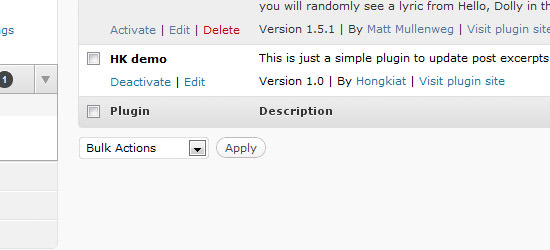
<figure id="bkmrk--34" style="box-sizing: border-box; word-break: normal; display: block; margin: 1.5em 0px; max-width: 100%; position: relative; color: rgb(38, 38, 38); font-family: 'PT Serif', Helvetica, Arial, sans-serif; font-size: 18px; font-style: normal; font-variant-ligatures: common-ligatures; font-variant-caps: normal; font-weight: 400; letter-spacing: normal; orphans: 2; text-align: start; text-indent: 0px; text-transform: none; widows: 2; word-spacing: 0px; -webkit-text-stroke-width: 0px; white-space: normal; background-color: rgb(255, 255, 255); text-decoration-thickness: initial; text-decoration-style: initial; text-decoration-color: initial;">![HK Demo Plugin Installed](https://assets.hongkiat.com/uploads/develop-wordpress-plugin/hk-demo-plugin.jpg)</figure>Once completed you’ll want to access the WordPress administration panel and browse your current set of plug-ins for the demo just installed. Once you activate nothing new will happen, not until we manually add in our function call.

To do this simply navigate `Appearance -> Editor` and look for **`single.php`**.

This file contains all the template HTML/CSS for your basic article post page. Scroll down until you find `the_content()` and replace with the example code above. This will limit all your article pages to 55 characters no matter what view is being used.

You could also add in this function to similar pages in your templates directory such as `search.php` or `archive.php`.

## Conclusion

These are some of the basics to get you started working within WordPress development. The plugin system is vast and contains a great deal of internal functionality.

If you already have an idea for a plug-in try it out on a local installation of WordPress to practice these topics.

If you’re still confused by much of the information you can review the [WordPress documentation](https://developer.wordpress.org/reference/) and search for your answer there.

The development community is full of helpful users and the forums hold archives with questions from years back